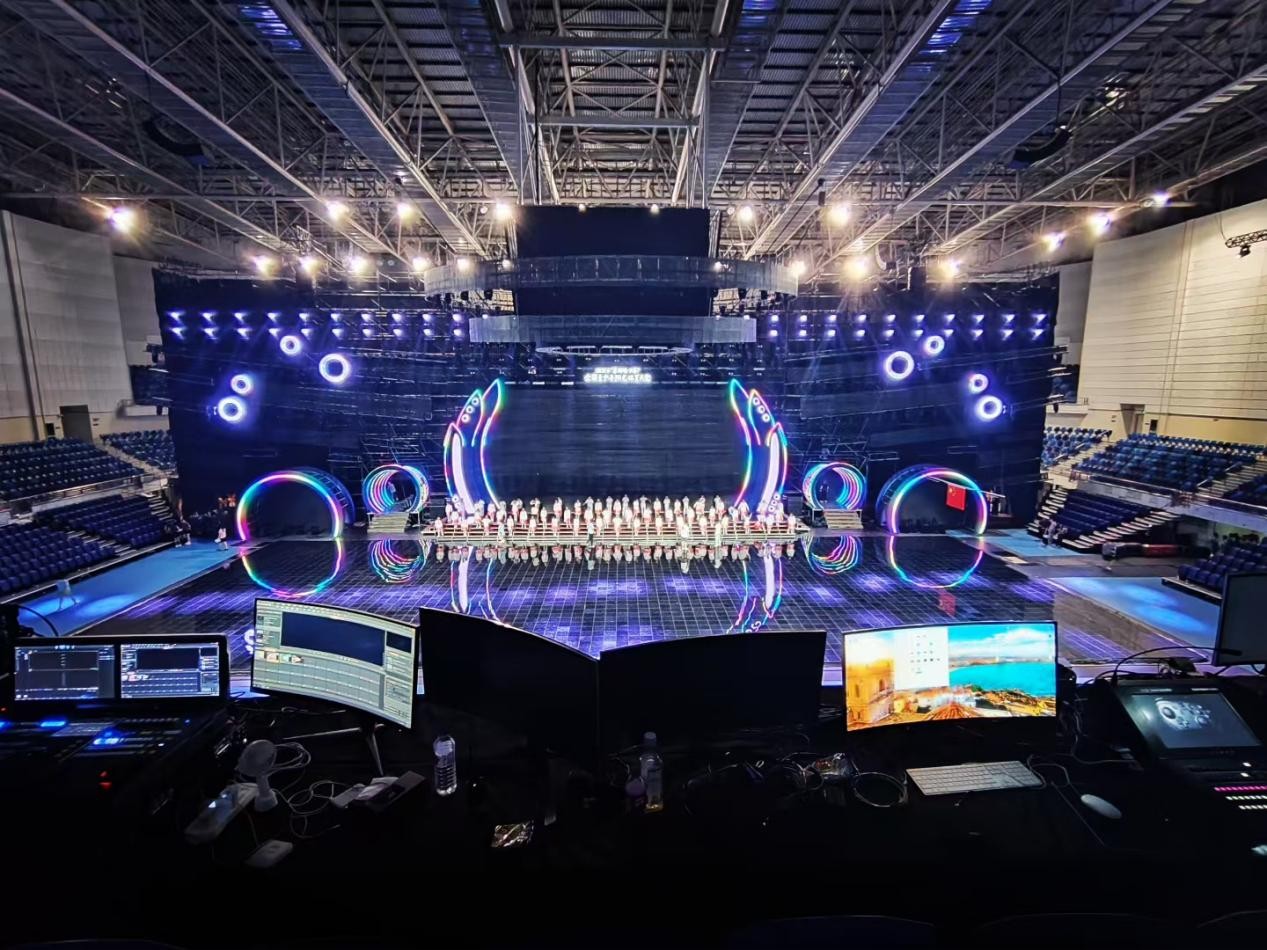
Choosing an LED media server for a live event is not simply about comparing resolution, the number of outputs, or price. At KYSTAR, we believe the right Kommander media server should be selected around the way the entire production will run—from the screen canvas and output architecture to the content workflow, synchronization, and backup plan. Whether you need a compact live event media server for a touring production or a more advanced LED media server for a multi-screen show, the starting point should always be the actual requirements of the event, rather than a specification label such as 4K or 8K.
When we help customers plan an LED display system, we usually start by looking at the production itself. A corporate event with one main LED wall, a touring concert with several independent screens, and an XR studio built around a large LED volume may all use LED displays, but the way those displays need to be controlled can be very different. Screen size and pixel load, input and output requirements, content workflow, synchronization, and backup all need to be considered before deciding which media server configuration makes sense.
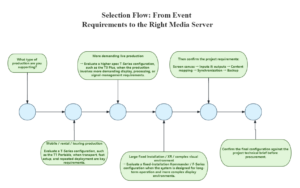
That is the approach we take throughout this guide. We’ll walk through the key questions we consider when selecting a media server, from the type and scale of the event to its signal architecture and reliability requirements. You’ll also find a practical decision tree, comparison table, and procurement brief that can help your team turn project requirements into a clearer equipment shortlist. Along the way, we’ll look at how KYSTAR’s Kommander portfolio can support different live events, touring productions, and more complex visual environments.
Event: The 38th Hundred Flowers Awards Opening & Closing Ceremonies – Beijing, China (Aug. 7–10, 2026)
Device used: Kommander T1 Media Server
Start with the Live Event Requirements, Not the Server Name
A common mistake when purchasing a media server is to start by comparing product models. You may first look at whether a system supports 4K or 8K, how many outputs it has, or how much it costs. These specifications matter, but they do not tell you whether the system is right for your production.
At KYSTAR, we recommend starting with the project itself. The event type, screen canvas, signal chain, content workflow, synchronization, and backup requirements should be clear before comparing specific media server models. Without this information, it is difficult to determine whether you need a compact system, a multi-server setup, or a higher-performance solution.
What Type of Event Are You Producing?
The event type is the first thing we look at because it helps define how the media server will be used. A corporate event may focus on presentations, video playback, and straightforward switching, while a concert or touring production may require multiple LED surfaces, dynamic content, fast setup, and synchronized playback. Broadcast productions can place greater emphasis on camera feeds and signal processing, while XR and virtual production require precise synchronization and system integration.
For immersive or cultural tourism projects, LED screens may also be curved, segmented, or integrated into unusual structures, making mapping and flexible screen layouts more important.
These categories are not rigid. One production can combine several of them. The goal is not to select a product immediately, but to understand the visual workload and operational requirements the system will face.
Event Type | Typical Need | Selection Focus |
| Corporate event | Multi-window, presentation, and video playback | Ease of operation, switching, and stable output |
| Concert / touring | Multiple LED surfaces and fast setup | Outputs, synchronization, backup, and transport |
| Broadcast | Capture low-latency and high-resolution signals | Input formats, capture, and frame synchronization |
| XR / virtual production | Real-time content and precise synchronization | GPU, sync, mapping, and system integration |
Calculate the Screen Canvas and Pixel Load
Once the production type is clear, the next step is to map the LED canvas. Document the number of LED screens, the resolution of each screen, the total pixel load, aspect ratios, and whether any screens have irregular structures. For example, a main LED wall, side screens, and a floor display may need to work as separate visual areas or as one combined canvas. These two workflows can place very different demands on a media server.
That is why we recommend looking beyond whether a system “supports 4K” or “supports 8K.” The more useful question is, what total pixel canvas does the production require, and how does that canvas need to be distributed across the LED system?
This becomes especially important when evaluating a multi-screen media server, because the system needs to handle not only the total visual data but also how that data is divided, positioned, synchronized, and delivered to different screens.
List Every Input and Output Before Comparing Products
Next, map the complete signal chain. List every source that may enter the system, such as presentation computers, playback systems, cameras, capture devices, and other video sources, and then identify where each signal needs to go.
At KYSTAR, we look at the signal chain as a whole rather than simply counting physical inputs and outputs. Four outputs, for example, can represent very different requirements depending on whether they form one synchronized canvas or independently drive four LED surfaces.
The same applies to inputs. It is not enough to know whether a system accepts HDMI, DisplayPort, or SDI. The available inputs, resolutions, frame rates, and processing capabilities also need to match the actual production workflow.
Build a One-Page Technical Requirement Brief
Before requesting a quotation, summarize the project in a simple technical brief. Include the event type, number and resolution of LED screens, input sources, output requirements, synchronization, backup, deployment method, and operation requirements.
This gives us enough context to recommend a suitable configuration rather than simply matching a product to one specification. It also gives your team a consistent basis for comparing different media server solutions.
Event: The 15th Sichuan Provincial Games opening ceremony—Guang’an, China | Jul. 17, 2026
Device used: Kommander Media Server
Match Media Server Features to the Show Workflow
Once the project requirements are clear, the next question we ask is what the media server actually needs to do during the show.
This is where product selection should move beyond a simple feature checklist. A function only matters when it solves a real production challenge. Layering, mapping, synchronization, and backup are valuable because they help operators manage content, coordinate multiple screens, or reduce the impact of system failures. The goal is to match each capability to the way the production will actually run.
When Do You Need a Live Event Media Server?
Not every LED installation needs the same level of media server capability.
For a simple display showing a predetermined video on one screen, basic playback may be sufficient. As the workflow becomes more dynamic, however, the media server can become an important part of the show’s control system.
A live event media server becomes particularly useful when operators need to trigger content through cues or timelines, change visual sequences during the show, manage multiple layers, respond to live sources, feed different LED surfaces independently, or keep several playback systems synchronized.
The key distinction is between simple playback and active visual production. If the system only needs to deliver one finished video to one display, advanced media-server functions may not be necessary. If operators need to coordinate multiple visual elements in real time across several displays, the media server needs to support the production workflow as a whole.
Why a Multi-Screen Media Server Needs More Than More Outputs
A common misconception is that a multi-screen production simply requires a media server with more physical outputs.
In practice, the challenge is often how the visual content is organized across those outputs. Consider a stage with a main LED backdrop, two side screens, and an LED floor. One scene may require a single visual canvas to span all four surfaces, while another may need independent content on each screen. Other scenes may involve picture-in-picture layouts or precise content positioning on an irregular LED structure.
This requires more than additional outputs. The system needs to manage the relationship between content, layers, screen geometry, and output destinations. Depending on the production, requirements may also include pixel-to-pixel mapping, independent playback, different output resolutions, or other forms of flexible screen control.
KYSTAR’s control-system portfolio includes capabilities such as multi-layer processing, scaling, overlapping, roaming, and non-rectangular loading in applicable video controller models. For buyers, however, the more useful question is not simply “How many outputs does the server have?” but “How will the server organize and distribute the visual canvas across the screens in my production?” That question provides a much better basis for comparing systems.
Check Synchronization, EDID, and Backup
As a production becomes more complex, synchronization and signal compatibility become increasingly important.
Frame synchronization is particularly important when multiple playback systems or display areas need to remain precisely aligned. At the same time, EDID behavior can affect how sources and display devices recognize and negotiate signal formats. If several sources, processors, and LED surfaces are connected together, unexpected changes in signal configuration can create problems that may not appear during a basic product demonstration.
Backup should also be considered from the beginning. For a high-risk live production, a primary/backup system is not useful simply because a second machine is available. The team needs to know how the backup is synchronized, how the transition is triggered, and what happens to the content during the switch.
KYSTAR’s Kommander portfolio includes solutions for synchronized multi-machine operation and backup applications, while applicable systems provide hardware EDID locking. When evaluating a configuration, we recommend asking how synchronization is maintained, how EDID behavior is controlled, whether multiple servers can operate in a synchronized setup, and how the system responds if the primary machine fails.
Test with Real Content, Not Only Static Test Patterns
A media server should ultimately be tested under conditions that resemble the actual show.
A static test pattern can confirm that a signal reaches the LED display, but it does not show how the system behaves when multiple layers are playing, high-bitrate video is running, input sources change, or equipment needs to recover from an interruption.
For this reason, we recommend testing with representative production content and the actual or simulated signal chain. Where relevant, this can include high-resolution and high-bitrate video, different frame-rate sources, multiple simultaneous layers, live camera or playback inputs, input interruptions, and device restarts.
The backup procedure should also be tested rather than simply documented. Operators should know how the backup is triggered, how long the transition takes, and whether content and synchronization remain stable during the switch.
Testing the system in these conditions gives the production team a much clearer picture of how the media server will perform when the event is actually underway.
Which Kommander Media Server Class Fits Your Event?
Once you have defined the screen canvas, signal sources, outputs, synchronization requirements, and backup expectations, you can narrow the choice to the right class of media server. At KYSTAR, we recommend matching the server to the production workflow first, then confirming the exact configuration against the technical requirements of the project.
T1 Portable for Mobile and Rental Productions
For rental companies and touring productions, a media server needs to fit a practical workflow: frequent transportation, repeated setup, on-site operation, and reuse across different events.
KYSTAR’s T1 product family is positioned for event and stage applications. A portable LED media server for event rental is therefore worth considering when transport flexibility and repeated deployment are important.
Portability should not be evaluated alone. Rental teams should still check the screen canvas, signal sources, outputs, mapping, and synchronization requirements for the productions they expect to support.
KYSTAR’s live entertainment projects include productions such as the Dragon TV New Year’s Eve Gala and Beirut’s Ehdeniyat Festival, where Kommander T1 media servers have been used in live-show environments.
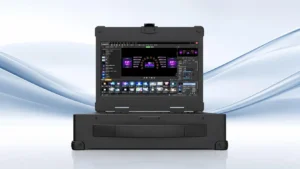
Kommander T Series – T1 Portable
T3 Plus for Higher-Spec Live Productions
For productions involving higher-resolution content, more demanding processing, multiple signal paths, or synchronized operation, a higher-spec live-production system may be more appropriate.
KYSTAR’s T3 platform is positioned for professional live-event applications. The exact configuration should be evaluated against the project’s resolution, pixel load, input sources, outputs, frame rate, synchronization, and processing requirements.
A useful example is the opening ceremony of the 17th Shaanxi Provincial Games, where a T3 media server was used in a main-and-backup configuration to support synchronized matrix-screen linkage across a large high-definition ground display.
This makes T3 a direction to evaluate for more demanding live productions, while simpler single-screen events may not require the same level of capability.
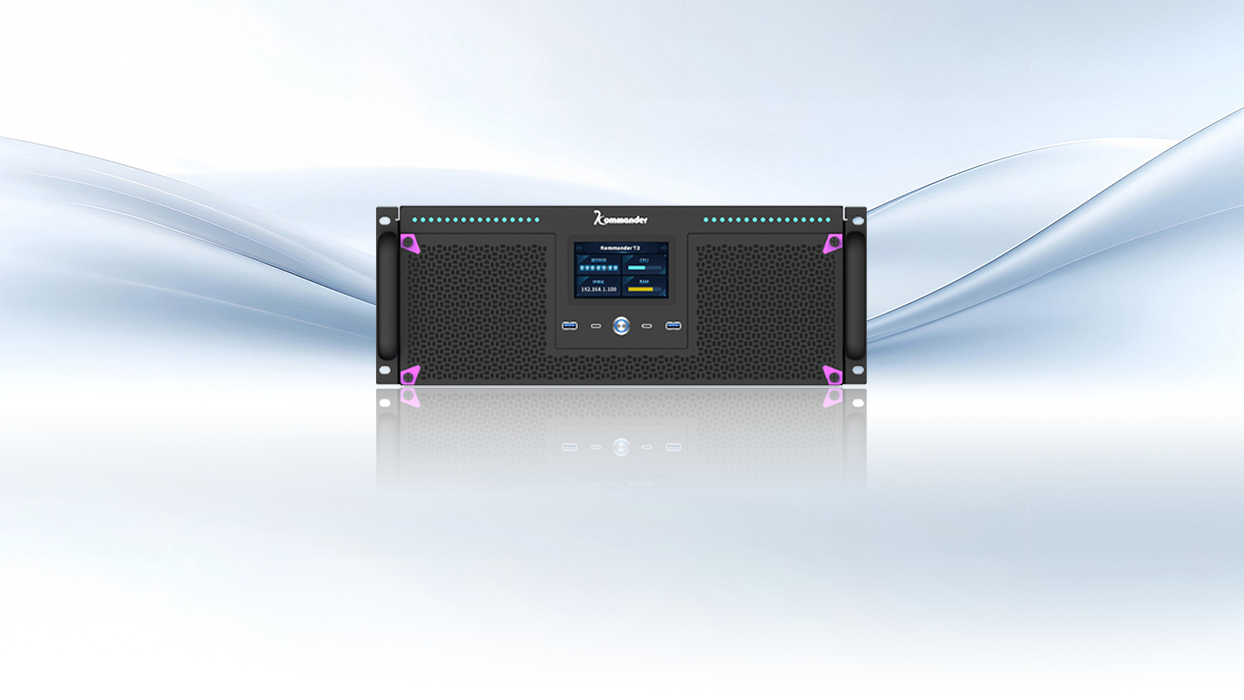
Fixed-Installation Kommander Systems for Large-Scale and XR Projects
Permanent installations have different priorities. The media server may need to support a large LED canvas, integrate with other control equipment, and operate as part of a long-term visual infrastructure.
KYSTAR‘s F-Series is positioned for large fixed installations and complex visual applications. This direction is particularly relevant when the system is part of a permanent environment rather than equipment that needs to be transported between venues.
XR and virtual production add further requirements because LED displays may need to work with cameras, tracking, real-time rendering, and synchronized content. KYSTAR’s project portfolio includes XR applications as well as command center and creative display projects.
A fixed-installation system is not automatically the best choice for every large project. For short-term rental or touring productions, a portable architecture may be more practical.
Product-Class Decision Matrix
| User Requirement | Recommended Direction | Not Ideal When |
| Fast transport and setup | Portable media server | Very large fixed installation |
| Multiple 4K/8K sources and outputs | Higher-spec live-production server | Simple single-screen playback |
| Multiple independent LED surfaces | Multi-screen media server | One simple LED wall |
| Large fixed or XR system | Fixed-installation system | Short-term rental project |
* This matrix is a starting point rather than a substitute for a project-specific technical specification. The final configuration should be confirmed against the actual screen canvas, content workflow, signal chain, synchronization, and backup requirements.
Build Your Media Server RFQ Around the Project
Once the product direction is clear, turn the production requirements into a practical RFQ.
Instead of requesting only an “LED media server” or a specific model, provide the number and resolution of LED screens, whether they are independent or combined, input sources, required outputs, and any mapping, layering, real-time content, or synchronization requirements.
The RFQ should also state whether the equipment is intended for rental, touring, or permanent installation, and whether a primary/backup configuration is required.
This makes supplier recommendations easier to evaluate. Two systems may both be described as an “8K media server,” while differing significantly in input architecture, output configuration, synchronization, processing, or backup capabilities.
For procurement teams, the goal should therefore be to compare complete system configurations rather than isolated specifications.
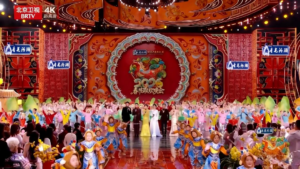
Event: Beijing Spring Festival Gala 2026—Beijing, China | Feb. 2026
Device used: Kommander Broadcast System
Conclusion: Choose the Media Server Around the Show, Not the Specification Sheet
Choosing the right LED media server starts with the production, not the specification sheet.
First, define the LED screens, signal sources, output requirements, synchronization, and backup needs. Then determine which media server architecture best fits the workflow. Mobile rental productions, higher-spec live events, and large fixed or XR projects may require different product paths.
Before purchasing, prepare a complete technical brief and test the system with representative production content. This makes it easier to confirm whether the proposed configuration can handle the actual screen canvas, signal chain, and show workflow.
If you are preparing an event production or requesting an RFQ, send us your LED screen resolution, number of displays, input sources, output requirements and backup expectations to receive a suitable media server configuration.
KYSTAR develops integrated video display and LED control solutions for global markets, supporting applications across live entertainment, sports, XR, exhibition and conference, command center, commercial display, and creative display environments.
FAQ
- Do I need a media server if I already have an LED processor?
Not necessarily. An LED processor typically focuses on video processing, scaling, switching, and display control, while a media server can handle more advanced playback, layering, mapping, rendering, and show-control workflows. Whether you need one or both depends on the content and signal-chain complexity.
- Is an 8K media server necessary for every live event?
No. 8K capability is not automatically necessary for every LED event. The decision should be based on content resolution, total LED canvas, number of independent displays, output requirements, processing workload, and potential future expansion.
- How many outputs should an LED media server have?
There is no universal number. The required output architecture depends on the number of screens, whether they operate independently or as one canvas, and whether preview or return outputs are needed. Output count should therefore be considered as part of the complete signal flow.
- What is the difference between a portable and fixed media server?
A portable media server is designed for temporary productions where equipment needs to be transported, deployed, and reused across venues. A fixed-installation system is designed more around long-term operation, integration, expansion, monitoring, and maintenance. Rental and touring companies may prioritize portability, while permanent installations typically place more emphasis on overall system architecture.
- How can I reduce the risk of a black screen during a live event?
Plan reliability at the system-design stage. Evaluate signal routing, frame synchronization, EDID behavior, backup architecture, power and cabling, and recovery procedures. Most importantly, test the complete system with representative production content before the event. For high-risk productions, a primary/backup configuration should be planned and rehearsed rather than added as an afterthought.